You can change the language you see on Ancestry at any time. The steps are different depending on whether you’re signed in or just visiting.
If you’re signed in
- In the top-right corner, click your Profile icon and select Account Settings.
- Scroll down to the Region and language section.
- Click your current setting. For example, United States (English).
- Choose your region and preferred language.
Language options vary based on the region you select. To see all available languages, choose Global. - Click Save.
Your language settings will be saved to your account and will be applied wherever you sign in to the Ancestry website.
You can change your region and language settings again at any time by repeating the steps above.
If you’re not signed in (or just visiting)
- In the top or bottom right corner of the Ancestry site, click the globe icon to open the region and language selector. If it’s not at the top, scroll to the bottom to find it.
- Select your region and preferred language.
- If you see the following message (or similar), select Continue to Ancestry.[site] to go to that version of Ancestry.
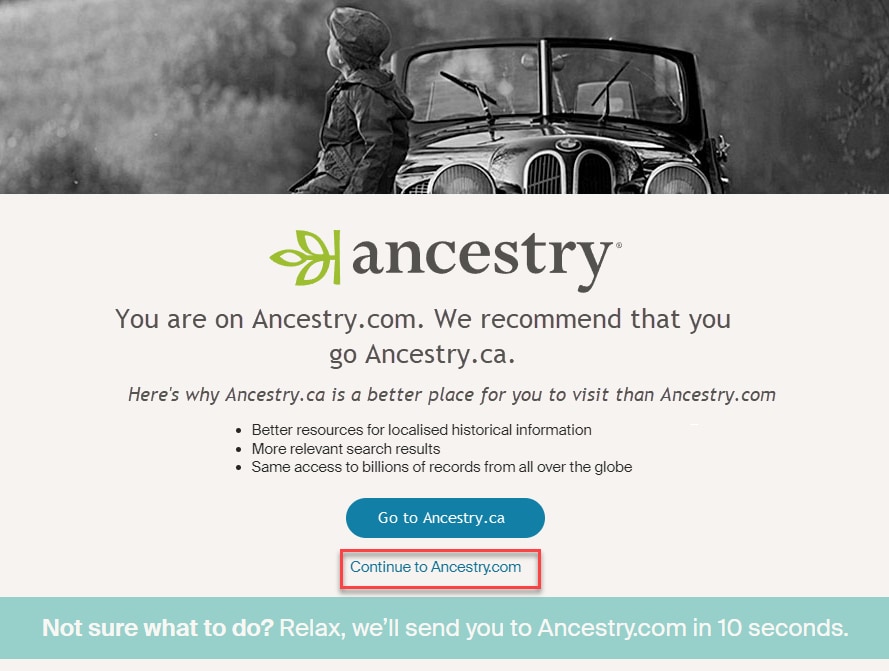
You can change your region and language settings again at any time by repeating the steps above.
Troubleshooting
If the region or language doesn’t change, keeps resetting, or behaves unexpectedly, try the following:
- Clear your browser’s cache and cookies
- Make sure your browser allows cookies
- Save your region and language selection again (if signed in)
Frequently asked questions
I don’t see the globe icon. What should I do?
If you don’t see the globe icon in the top or bottom right corner:
- Make sure you’re on the Ancestry website, not the Ancestry app or Support Center.
- Go to Account Settings (if you’re signed in) to change your region and language.
- Try checking the Ancestry homepage.
How do I change the language on my Ancestry app?
To change the language on your Ancestry app, update the language settings on your mobile device. Select your device below for help:
What languages is the Ancestry app available in?
The Ancestry App is available in English, Swedish, German, French, Spanish, and Italian.
What if my region or language isn’t available?
We’re still adding more regions and languages. If yours isn’t listed yet, choose the closest match. When new options become available, they’ll appear in your Account Settings (when signed in) or by clicking the globe icon at the top or bottom of Ancestry (when not signed in)
Will there be more regions and language options?
Yes. More options are coming soon. You can check for new options at any time in your Account Settings (when signed in) or by clicking the globe icon at the top or bottom of Ancestry (when not signed in).